A3 Rustic Frame Mockup: Modern Minimalis for Clean Designs
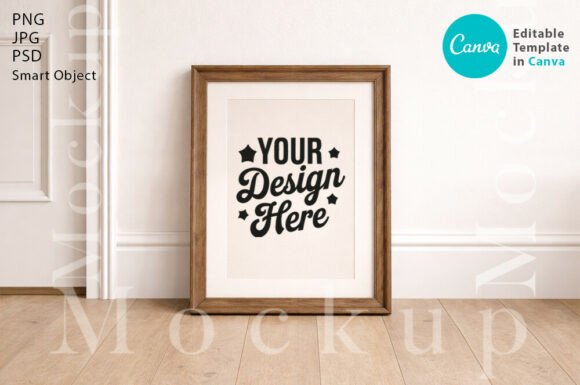
When you're showcasing your artwork, photography, or branding designs, the frame itself tells a story. The A3 Rustic Frame Mockup, Modern Minimalis strikes a fascinating balance—it carries the warmth and texture of natural wood while maintaining the clean, uncluttered lines that contemporary design demands. This isn't your grandmother's ornate picture frame. It's a light-wood frame with a thin profile that feels intentional, restrained, and surprisingly versatile.
Understanding the Visual Character of This Mockup
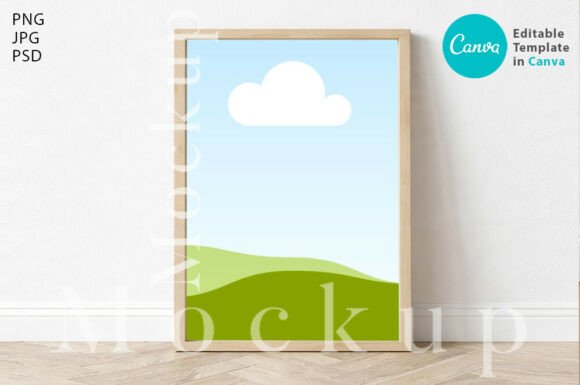
Let's talk about what you're actually looking at. The frame features a light-wood finish—think birch or pale oak—without heavy grain patterns or rustic distressing that might compete with your content. The "thin" aspect matters more than you might expect. A narrow frame profile keeps the focus squarely on what's inside the frame rather than drawing attention to the border itself. That's exactly what you want when presenting logo design concepts, editorial design layouts, or social media graphics to clients.
The modern minimalis aesthetic here works because it doesn't try too hard. There's no faux vintage patina, no exaggerated shadows, no dramatic angles. The frame sits naturally against a clean background, giving your designs room to breathe. For anyone working in brand identity or packaging design, this kind of restraint in your presentation materials actually elevates the work itself. Clients see your designs, not the props around them.
Where This Mockup Truly Shines
I've seen designers spend hours staging flat lays and lifestyle shots when a simple, well-crafted mockup does the job better. The A3 Rustic Frame Mockup works beautifully across several real-world scenarios:
- Portfolio presentations – Whether you're a freelance designer pitching to new clients or building your Behance profile, presenting work inside a realistic frame adds context without distraction.
- Etsy and online shop listings – If you sell printable art, typography prints, or digital downloads, showing them "in frame" helps buyers visualize the final product hanging on their wall.
- Blog and website headers – Content creators and bloggers can use framed artwork mockups to create cohesive visual themes across their platforms.
- Social media content – Instagram posts, Pinterest pins, and Facebook ads all benefit from polished presentation. A clean frame mockup photographs well at any crop ratio.
- Client presentations – When you're showing a web design concept or print layout, contextualizing it inside a frame helps stakeholders see the finished product rather than staring at a flat PDF.
The light-wood tone also plays well with a wide range of color palettes. Whether your design leans warm, cool, monochromatic, or vibrant, a neutral wood frame won't clash. That adaptability makes it a practical addition to any designer's design assets library.
What You're Getting With This Digital Download
This is an instant digital download—no waiting for shipping, no physical product. Once you complete your purchase, you receive access to multiple file formats designed to fit whatever software you prefer working in:
- Canva Templates – A link provided in a PDF file, making it accessible even if you don't have professional design software. Great for small business owners, marketers, and hobbyists who work primarily in Canva.
- Digital JPG and PNG Files – High-resolution files at 3000 x 2400 pixels, ready for web or print use. The PNG comes with a transparent background, giving you flexibility to layer the frame over any environment or backdrop you choose.
- PSD File with Smart Objects – For Photoshop users, the smart object layer lets you drop your artwork into the frame with a simple double-click. Your design automatically adjusts to the frame's perspective and lighting. This alone saves significant time compared to manually warping and adjusting artwork to fit a photographed frame.
The image dimensions—3000 x 2400 pixels—give you enough resolution for most digital applications and even some print scenarios. You won't be stretching pixels or dealing with blurry edges at standard screen sizes.
Practical Tips for Getting the Most Out of This Mockup
A few observations from working with frame mockups like this one:
Match the frame to your audience. If you're presenting to corporate clients or working on commercial font licensing projects, this modern minimalis style reads as professional and current. For more traditional audiences, you might pair it with serif-heavy typography inside the frame to bridge classic and contemporary.
Pay attention to your artwork's aspect ratio. A3 format has specific proportions. Make sure the design you're placing inside the frame is cropped or sized to A3 dimensions, or you'll end up with awkward white space or forced cropping.
Use the transparent PNG strategically. Layering the frame with a transparent background onto custom backgrounds, textured surfaces, or lifestyle photography creates a more personalized presentation than using the default backdrop alone. This is especially useful for packaging design mockups or brand mood boards.
Test different content types. Don't limit yourself to hanging art prints. Try placing web design screenshots, typography specimens, photography, illustration, or even social media post layouts inside the frame. The modern thin profile is neutral enough to support almost any visual content.
Why Presentation Mockups Matter More Than You Think
Here's something that separates good designers from great ones: the way work gets presented often matters as much as the work itself. A beautifully designed poster shown as a flat digital file on a white background feels incomplete. The same poster shown inside a realistic frame, with subtle shadows and natural wood texture, suddenly feels tangible. It feels real. Your client can imagine it on their office wall, in their retail space, or above their living room couch.
The A3 Rustic Frame Mockup, Modern Minimalis and the Wooden Modern Thin light-wood frame Mockup both serve this purpose without overwhelming your content. They're tools that support your creative vision rather than competing with it.
For designers, entrepreneurs, bloggers, and content creators building a professional presentation toolkit, having a reliable, high-quality frame mockup on hand eliminates one more friction point in your workflow. You spend less time staging and more time creating. And in a field where your portfolio is your storefront, that polished presentation can be the difference between a scroll-past and a signed contract.